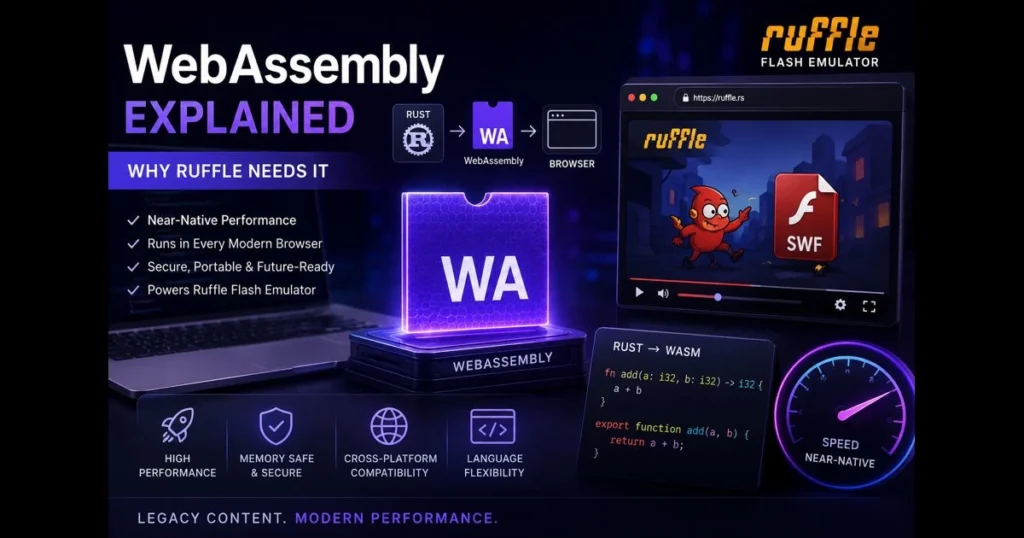
If you’ve heard developers rave about speed in the browser and wondered “what is WebAssembly,” you’re in the right place. WebAssembly (often shortened to Wasm) is a low-level, binary instruction format that runs alongside JavaScript, delivering near-native performance on the web. Code written in languages like Rust, C, or C++ can compile to a compact module, enabling rapid execution within browsers. Ruffle—an open-source Flash Player emulator—leverages this capability to recreate classic SWF content without plugins, right in modern browsers. Below, you’ll find a straightforward explanation of WebAssembly, practical use cases, and an exploration of how Ruffle utilizes it, along with tips for troubleshooting common issues and resources to help you get started. Related reading: enable webgl.
- Understanding WebAssembly
- The Technical Architecture of WebAssembly
- Benefits of WebAssembly
- WebAssembly Explained: Use Cases
- The Role of WebAssembly in Modern Browsers
- Ruffle: A Case Study in WebAssembly Implementation
- Future of WebAssembly
- Getting Started with WebAssembly
Understanding WebAssembly
Definition of WebAssembly and its purpose
WebAssembly is a standardized binary format and execution environment for running compiled code on the web. It’s designed to be small, fast to decode, and safe to run in the browser’s sandbox. (See: WebAssembly – Wikipedia.)
Unlike JavaScript, which is human-readable and dynamically typed, Wasm is compact and strongly typed, optimized for computation-heavy tasks. Its goal is not to replace JavaScript but to complement it, allowing each to excel in its domain while working seamlessly together. This collaboration provides benefits once thought unreachable for browser apps, such as high-fidelity 2D/3D rendering, audio processing, and complex simulations.
How WebAssembly differs from traditional web technologies
Traditional web apps primarily rely on HTML, CSS, and JavaScript, excelling at UI, responsive layouts, and frequently changing business logic. In contrast, WebAssembly arrives as a precompiled module, eliminating costly parse and compile steps at runtime and relying on a predictable, low-level instruction set. The result is that tight loops, math-heavy routines, and graphics pipelines operate far more efficiently.
Think of it this way: JavaScript orchestrates; WebAssembly powers the engine. Together, they create an app that’s both ergonomic and fast.
The Technical Architecture of WebAssembly
Overview of the binary format and execution model
At its core, WebAssembly is a stack-based virtual machine with a well-specified instruction set. Developers write code in languages like Rust or C/C++, compile it to Wasm, and ship a small .wasm binary. The browser validates this binary for safety, compiles it to native machine code using its JIT or baseline compiler, and executes it within the same security sandbox as JavaScript.
This architecture emphasizes portability and safety. There’s no arbitrary pointer access to the host system, and memory is a linear, bounds-checked region. Imports and exports clearly define the module’s surface area, allowing Wasm to deliver speed while maintaining web security.
How WebAssembly interacts with JavaScript and the DOM
Wasm doesn’t communicate directly with the DOM. Instead, it interacts through JavaScript bindings. You load a WebAssembly module, pass data into its exported functions, and receive results back. For any DOM updates, you invoke JavaScript to set text, change styles, or draw on a canvas.
In practice, high-performance tasks like video frame decoding or physics simulation remain in Wasm, while JavaScript handles events and UI interactions. Many projects utilize an offscreen buffer from WebAssembly, rendering visuals via WebGL or canvas APIs for fluid graphics.
Benefits of WebAssembly
Performance improvements over JavaScript
WebAssembly excels in CPU-intensive workloads such as compression, image processing, and real-time effects. Its predictable format enables engines to optimize aggressively, and its compact binary size reduces load times for large libraries. While JavaScript engines have become remarkably fast, Wasm’s low-level instructions and memory model keep it close to native speeds for tight loops and SIMD-friendly tasks.
In short, use JavaScript for flexibility and Wasm when you need raw throughput.
As of now, support for some advanced WebAssembly features—such as threads and SIMD—varies across browsers and platforms. Threads typically require cross-origin isolation, and not all engines enable every proposal by default. Use feature detection and provide fallbacks or progressive enhancement, and consult current compatibility tables before depending on these features.
Cross-platform compatibility and its significance
WebAssembly operates on any modern browser, including desktops, mobiles, and even some unconventional platforms like smart TVs. This universality provides teams with a single, portable compilation target, eliminating the need for OS-specific builds. For organizations updating legacy C/C++ code, compiling to Wasm modernizes a codebase without a complete rewrite for the browser. This remains one of the most enduring benefits of WebAssembly for long-lived software.
WebAssembly Explained: Use Cases
Applications in gaming and multimedia
Browser games require fast graphics, crisp audio, and low input latency. Wasm integrates seamlessly with WebGL and WebAudio, especially when physics engines or asset pipelines are involved. A small optimization, like selecting efficient textures or enabling WebGL, can transform a stuttering demo into a smooth, engaging experience.
Multimedia editors—such as video cutters, image editors, or audio workstations—also reap the rewards. Encoding, filtering, and spectral analysis are classic scenarios where offloading heavy algorithms to WebAssembly proves advantageous.
Use in scientific computing and large data processing
Data scientists and researchers are bringing simulations, inference engines, and visualization toolkits to the web. Parsing massive datasets, executing matrix operations, or running cryptographic computations becomes feasible when those core loops are managed in Wasm. The browser UI orchestrates datasets, sliders, and charts while the core computation remains close to the hardware.
The outcome is shareable, zero-install research applications that colleagues can access in a browser tab instead of a native IDE.
The Role of WebAssembly in Modern Browsers
How major browsers support WebAssembly
WebAssembly is a web standard developed through the W3C Community and Working Groups. Modern engines in Chrome, Firefox, Safari, and Edge implement it using their own compilers and security sandboxes. While features like threads, SIMD, and reference types evolve over time, the ability to load and run .wasm modules is widely supported. Always check current feature support before relying on cutting-edge opcodes.
The impact of WebAssembly on web development practices
Development teams now think in two layers. UI/UX remains in TypeScript or modern frameworks, while performance-critical paths shift to Rust or C++ compiled to Wasm. Build pipelines incorporate tools like Emscripten or wasm-pack, and quality assurance expands to include performance traces in browser DevTools. This evolution doesn’t discard JavaScript; it clarifies its role as the orchestrator around optimized compute kernels.
Ruffle: A Case Study in WebAssembly Implementation
Introduction to Ruffle and its purpose
Ruffle is an open-source Flash Player emulator that renders SWF content on the web without the legacy Flash plugin, enabling educators, archivists, and fans to preserve interactive cartoons, games, and learning materials.
Given that legacy ActionScript and vector timelines can be resource-intensive, Ruffle benefits significantly from speed and safety—enter WebAssembly.
How Ruffle utilizes WebAssembly for performance enhancements
Ruffle’s core is primarily written in Rust, which compiles to Wasm for browser execution. The Wasm module manages parsing SWF files, executing the ActionScript virtual machine, rasterizing vectors, and mixing audio. JavaScript serves as the connector—loading files, interfacing with the canvas, responding to user input, and linking to the DOM. This separation ensures performance-critical paths—like frame advancement and display list updates—stay within the compiled module.
If you encounter issues, start simple. Use the built-in flash compatibility check to confirm your browser supports the necessary features and that content is served with the correct headers. If you see “swf not loading ruffle” in your console, verify cross-origin settings, ensure assets are served over HTTPS, and check that your graphics preferences don’t disable hardware acceleration. Some scenes may require enabling WebGL for optimal canvas rendering.
Future of WebAssembly
Emerging trends and developments in WebAssembly
The future of WebAssembly is increasingly modular and capability-driven. Proposals like the Component Model aim to simplify the composition, sharing, and reuse of Wasm modules across languages. Memory features such as relaxed SIMD and improved threads APIs are designed to extract more performance from multicore devices while maintaining safety constraints.
Beyond the browser, Wasm is gaining traction for serverless isolates and plugin systems. The same portability and sandboxing that enhance browser functionality also benefit multi-tenant backends.
Predictions for WebAssembly’s role in web technology
A clearer division of labor is on the horizon: JavaScript and Web APIs will handle ergonomics and integration, while WebAssembly will focus on compute tasks. As the toolchain matures, more teams will port established native libraries instead of re-implementing them in JavaScript, speeding up delivery while reducing bugs. Projects like Ruffle will continue to demonstrate how legacy content can thrive through a secure, standards-based runtime.
Getting Started with WebAssembly
Resources for learning WebAssembly
A growing library of WebAssembly tutorials offers guidance on compiling small Rust or C functions to Wasm, importing them into JavaScript, and passing data between them. Official documentation from language toolchains—such as Rust’s wasm-bindgen and wasm-pack guides, or Emscripten’s documentation for C/C++—provides step-by-step paths from “hello world” to real modules. For architecture deep dives, the WebAssembly specification and explainer documents deliver detailed references without ambiguity.
Hands-on practice is crucial. Start with a simple function—like an image blur—compile it, and measure its performance.
Tools and frameworks to build WebAssembly applications
- Rust + wasm-pack/wasm-bindgen: A polished toolchain that offers high-quality bindings to JavaScript and TypeScript.
- Emscripten (C/C++): A mature pipeline for porting native codebases to the web, including SDL and OpenGL-to-WebGL shims.
- AssemblyScript: A TypeScript-like syntax that compiles to Wasm, ideal for teams already proficient in TypeScript.
- DevTools and profiling: Browser DevTools, WebAssembly text format (WAT) viewers, and flame charts help pinpoint hot loops and memory issues.
For Ruffle integration, consult the project’s documentation to embed the player, load SWFs, and configure security headers. When testing legacy content, run the Flash compatibility check to identify feature gaps early and minimize regressions.
WebAssembly Explained: Why It Matters Now
WebAssembly introduces a disciplined, performance-first model to the browser while preserving the safety and reach that make the web universal. It doesn’t replace your existing stack; it enhances it. Projects like Ruffle demonstrate this by reviving rich, interactive media within a modern, secure runtime. Curious? Try a simple module, profile its performance, and observe the changes when you move hot code into Wasm. Then, take action: deliver a faster editor, enhance data tools, or restore a classroom activity that once required a plugin.
Ready to explore? Create a sample with the tools mentioned, run the Flash compatibility check for SWFs, and consider a pilot using Ruffle on a staging page. Your next performance breakthrough might just be a compile away.
Frequently Asked Questions
What is WebAssembly?
WebAssembly (Wasm) is a binary instruction format that allows high-performance applications to run in web browsers. It is designed to complement JavaScript by enabling developers to use languages like C, C++, and Rust for web development.
How does WebAssembly improve web performance?
WebAssembly improves web performance by providing a low-level, efficient binary format that can be executed at near-native speed. This enables developers to run compute-intensive tasks in the browser without sacrificing performance.
What are the use cases for WebAssembly?
WebAssembly is used for various applications, including gaming, video editing, and other performance-critical applications. It allows developers to leverage existing codebases and libraries to enhance web application capabilities.