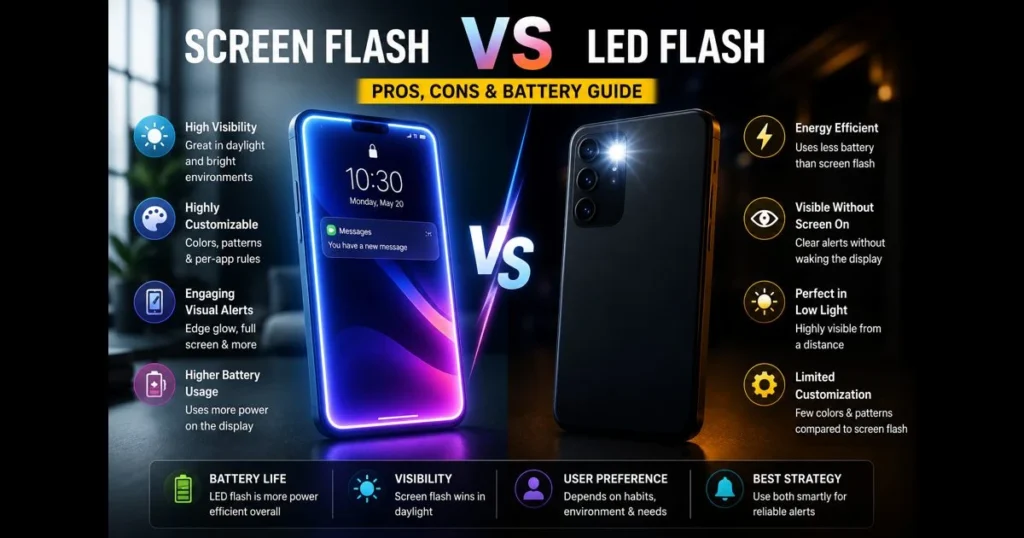
Screen flash vs. LED flash is more than a style choice—it defines how you notice calls, texts, and app notifications throughout the day. If you’ve ever missed a buzz in sunlight or been startled by a bright strobe at night, you understand the stakes. This guide compares how each method works, where they excel, and how they affect battery life and user experience. We’ll examine practical trade-offs, smart notification settings, and when to use both for reliable smartphone notifications. You’ll also find tips for testing your setup and fine-tuning visual alerts to enhance your experience without the hassle. Whether you prefer a subtle edge glow or a camera-flash pop from across the room, the right choice depends on context, habit, and comfort. Let’s compare thoughtfully so your phone alerts fit your day—not the other way around.
- Understanding Flash Alert Types
- Pros of Screen Flash Notifications
- Cons of Screen Flash Notifications
- Pros of LED Flash Alerts
- Cons of LED Flash Alerts
- Battery Life Considerations
- User Preferences and Use Cases
- Future Trends in Notification Systems
1. Understanding Flash Alert Types
Definition of screen flash notifications
A screen flash notification briefly lights up part or all of your display to signal an alert. Picture a bright pulse, an animated border, or a color wash that appears without fully unlocking the phone. Many devices offer settings in Accessibility or Alerts, allowing you to tweak duration and intensity. Some users opt for notification flash apps to add patterns, colors, or edge lighting beyond the default software options. (See: Flash photography.)
Overview of LED flash alerts
LED flash alerts utilize your phone’s camera flash diode to blink during specific events. This high-intensity burst is easily visible from across a room, even with the screen off. You can typically control the behavior through system Accessibility menus, enabling alerts for calls, messages, or all notifications. In this guide, “LED flash” refers specifically to the standard LED camera flash used on smartphones for notifications—not to be confused with laser-based systems, xenon flashes, or other camera technologies found in specialized imaging equipment.
2. Pros of Screen Flash Notifications
Visibility in bright environments
Screen flashes shine in sunlight or harsh indoor lighting. A full-screen white pulse or bold edge glow can outperform a small point-source light. If your phone is face-up on a desk, the larger surface area makes it hard to miss screen-based visual alerts.
Customization options for users
Screen alerts excel at device customization. You can choose colors, regions (status bar, edges), and animation styles, allowing different apps to “feel” distinct. This separation helps you triage at a glance: work apps might use a cool tone while personal messages feature a warm hue. Third-party notification flash apps offer even more options, including schedules and per-app rules, enabling notifications to adapt to your habits.
3. Cons of Screen Flash Notifications
Potential for screen burn-in
On OLED panels, static, high-brightness elements can cause image retention over time. To avoid this, choose moving or full-screen pulses instead of a fixed tile, shorten durations, and rotate colors or positions when possible. These balanced settings minimize risk while maintaining noticeability.
May drain battery faster in certain conditions
Lighting up a large portion of the display at high brightness is energy-intensive. Frequent alerts or long flash durations can noticeably impact battery life compared to minimal light sources.
4. Pros of LED Flash Alerts
Energy efficiency compared to screen flashes
A single LED flash can be more efficient than activating the entire display. A momentary burst often uses less energy than a high-brightness screen pulse of similar visibility, making the camera-flash method appealing for those who want “off-screen” awareness without waking the display.
Clear indication of notifications without screen activation
Because only the camera’s flash diode blinks—without lighting the display—the alert minimizes exposure to on-screen content and helps you stay focused on your current task. That single bright pulse, followed by darkness, reduces distraction while keeping you responsive.
5. Cons of LED Flash Alerts
Limited visibility in daylight
Strong ambient light can overpower a single point of light, especially if the phone is face-up. If your device is in a bag or pocket, the light may be blocked entirely. A back-mounted diode works well on a table face-down but less effectively in bright environments.
Fewer customization options
An LED is typically binary: on or off, with limited frequency adjustments. Color variety and patterns are restricted because there’s usually just one white diode. If you need per-app nuance, a screen-based method offers more flexibility.
6. Battery Life Considerations
Impact of screen flash on battery consumption
Screen power draw depends on brightness, area, and duration. A quick, low-brightness pulse along the edges is gentler than a long, full-screen white flash. OLED panels are most efficient with darker content; white-heavy animations consume more energy. To optimize for battery efficiency, shorten durations, lower peak brightness, and limit which apps can trigger a flash. Reserve screen pulses for high-priority notifications.
Battery performance with LED flash alerts
While the camera flash is bright, rapid strobing can add up. For infrequent alerts, however, a single diode pulse generally uses less power than waking the display. If you anticipate clusters of messages, consider capping the number of flashes per minute or batching notifications.
7. User Preferences and Use Cases
Situations that favor screen flash notifications
In outdoor settings, open-plan offices, or when your phone is face-up, the display’s larger canvas excels. Screen pulses are also better in quiet environments; you can set a soft edge glow noticeable to you but not disruptive to others. Users managing many app categories often prefer screen-based cues for quicker triage. Some drivers use a subtle screen edge flash for hands-free notifications when relying on a legally mounted phone and driving modes.
When LED flash alerts are more suitable
In dim rooms or from across a studio, a bright LED pop is impossible to miss. If your phone is face-down to avoid distractions, the back-mounted diode is perfectly placed. Professionals in meetings often prefer an LED blink to avoid lighting the entire screen and distracting others. Photographers, healthcare workers on call, and parents monitoring sleeping newborns often choose LED alerts for a simple “ping of light” that avoids tempting distraction. To fine-tune your setup, use our site’s built-in screen_flash_tester for a quick screen flash test and test flash notifications under various lighting conditions; then compare against an LED blink at different distances. For granular rules or schedules, explore reliable notification flash apps tailored to your daily rhythms.
8. Future Trends in Notification Systems
Emerging technologies in flash alerts
Manufacturers are experimenting with edge lighting on curved glass, subtle under-display indicators, and mini light strips around camera areas. Foldable devices introduce new canvases: outer screens can pulse gently while the inner display remains untouched. Expect more “ambient-first” designs prioritizing glanceability without glare.
Integration of AI in notification preferences
On-device intelligence is evolving to learn when and how to alert you. Imagine a system that senses ambient light, your calendar, recent interactions, and battery status, automatically choosing between an LED pulse or a subdued edge glow. Over time, it could adapt your rules, turning raw flash alert types into a context-aware system that respects your routines. The promise is smarter defaults, less fiddling, and a calmer user experience.
The best alert is the one you notice without frustration. Try both methods this week: set conservative profiles for each, run real-world tests with our screen_flash_tester, and refine your notification settings until the signals align with your day. If battery life is your priority, default to LED pulses for low-importance events and reserve screen flashes for high-priority notifications. If visibility in bright light is crucial, consider the opposite. Ready to optimize? Open your settings, run a quick screen flash test, and make your phone work for you.
Frequently Asked Questions
What is the difference between screen flash and LED flash?
Screen flash uses the device’s display to emit bright light, while LED flash utilizes a separate light-emitting diode for illumination. Screen flash may provide softer lighting, whereas LED flash typically offers a more powerful and focused light source.
When should I use screen flash instead of LED flash?
Screen flash is useful in low-light conditions where a softer light is desirable, making it ideal for portraits or selfies. In contrast, LED flash is better for capturing subjects in complete darkness or when a stronger light is needed.
Does screen flash affect battery life more than LED flash?
Yes, using screen flash can drain the battery more rapidly as it relies on the device’s display, which consumes more power than the dedicated LED flash. However, the impact may vary depending on the device and usage duration.