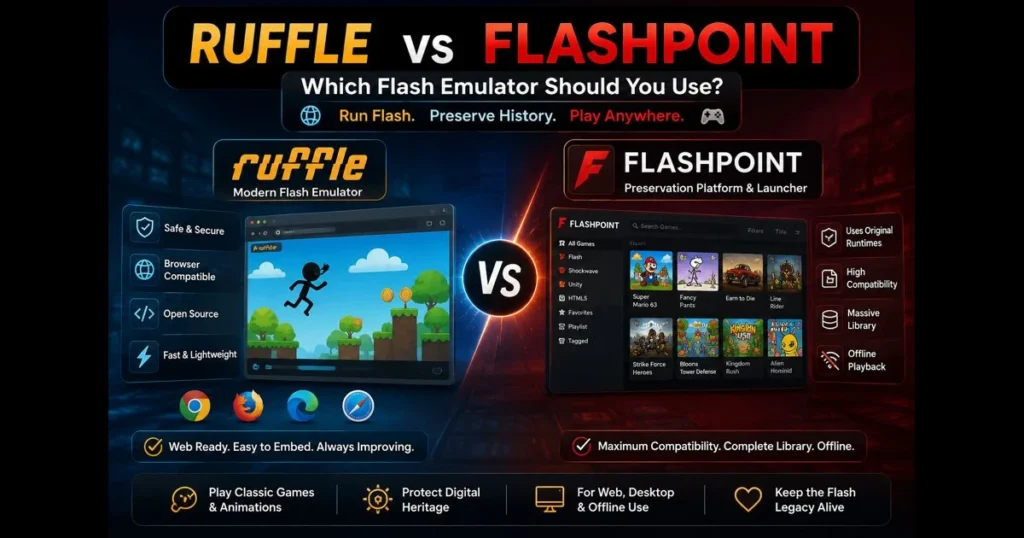
The Flash era may have officially ended, but its culture, art, and creativity remain vibrant. If you’re torn between Ruffle and Flashpoint, this guide breaks down how each works, their strengths, and which one suits your needs best. We’ll compare performance, browser compatibility, installation, and support—helping you keep those nostalgic classics running smoothly. Related reading: open swf without flash player.
Whether you’re securing a museum kiosk, restoring a legacy webpage, or just revisiting favorite Flash games, your choice is crucial. Choose wisely for a seamless experience; pick poorly, and you might face missing features or frustrating setups. (See: Ruffle (emulator).)
- Understanding Flash Emulators
- Overview of Ruffle
- Overview of Flashpoint
- Direct Comparison: Ruffle vs Flashpoint
- Installation and Setup
- Community and Support
- Use Cases: When to Choose Ruffle or Flashpoint
- Conclusion: Making the Right Choice
1. Understanding Flash Emulators
Definition and purpose of Flash emulators
A Flash emulator re-creates key functionalities of Adobe Flash Player so SWF files can run without the original plugin. Ruffle stands out as the leading open-source Flash emulator, reimplementing Flash with modern, safe technologies, eliminating the need for the deprecated plugin entirely.
In contrast, Flashpoint functions as a preservation platform and launcher that uses original runtimes inside a secure environment. This distinction is significant: emulation focuses on portability and security, while preservation aims for maximum fidelity by safely wrapping legacy software.
Importance of preserving Flash content in today’s digital landscape
Flash hosted countless animations, interactive stories, and games that shaped web culture. Without tools to access SWFs, this creative legacy risks vanishing. Preserving Flash content is not merely nostalgic; it ensures that digital artifacts remain usable for educators, researchers, and fans.
As browsers phase out old plugins, emulation and secure launchers bridge the gap, allowing creators’ works to be experienced as intended while respecting their rights.
2. Overview of Ruffle
What is Ruffle and how it works
Ruffle is a Rust-based project actively developed to emulate Flash using WebAssembly for web applications and native builds for desktop. You can embed Ruffle on a website or install a desktop app, enabling SWF playback without relying on the old plugin.
Ruffle implements Flash’s virtual machines and graphics pipelines, offering robust support for older content while gradually enhancing compatibility with newer features. By running within modern browser sandboxes or as a secure desktop app, Ruffle avoids the security issues that plagued Flash.
Key features and benefits of Ruffle
- Modern delivery: Embed a script on a webpage for seamless access to classic animations across major browsers, no plugin needed.
- Strong support for classic content: Many titles built with ActionScript 1/2 perform well, while support for more complex ActionScript 3 projects is improving.
- Security by design: Emulation within current browser models mitigates legacy vulnerabilities.
- Flexible formats: Options include web embeds, browser extensions, and desktop apps to accommodate various workflows.
- Community trust: Ruffle is used by initiatives like the Internet Archive and Newgrounds to keep older content accessible.
For a lightweight, standards-based emulator that’s easy to share, Ruffle is an excellent choice—especially for webmasters or educators looking to host a curated collection of animations.
3. Overview of Flashpoint
What is Flashpoint and how it operates
BlueMaxima’s Flashpoint is a large-scale initiative focused on preserving web-era games and animations. It doesn’t emulate; instead, it combines a portable browser, a secure player, and curated entries to run legacy content offline as it was originally designed. Think of it as a museum-quality playback system streamlined for everyday use.
Although it’s sometimes mislabeled as an emulator, Flashpoint is a preservation platform and launcher: it uses original runtimes, wrapped in a sandbox, to run legacy content as originally designed.
Key features and benefits of Flashpoint
- High fidelity: Complex SWFs and multi-asset games typically function as intended due to the use of the real runtime.
- Big-tent preservation: Supports Flash and other legacy platforms (e.g., Shockwave, Unity Web Player) for a comprehensive archive management.
- Curated library and metadata: Each entry includes descriptions, screenshots, and tags, making it ideal for classrooms and exhibits.
- Offline focus: Perfect for environments with limited or no internet access.
If your priorities include maximum compatibility and an organized catalog experience, Flashpoint is designed for you.
4. Direct Comparison: Ruffle vs Flashpoint
Performance and compatibility with Flash content
Ruffle performs well with older titles, offering smooth playback and quick startup due to WebAssembly and native builds. Compatibility is strongest for classic animations and games designed for AVM1 (AS1/2), while modern AS3/AVM2 content is still being enhanced; some projects work well, but those relying on advanced features like filters or 3D APIs may face issues.
Flashpoint, leveraging the original Flash Player, generally provides higher compatibility across a broader range of Flash content, including complex, multi-scene games. If you’re reviving a platformer with custom loaders or audio quirks, Flashpoint is often the safer option.
User interface and ease of use
Ruffle’s minimalist design makes it user-friendly. The web embed is nearly invisible, and the desktop app functions simply as a file opener. For creators, integrating Ruffle is a one-time task that scales easily across your archive.
Flashpoint features a full launcher with search capabilities, playlists, and detailed metadata. It requires more setup than a simple script tag, but once up and running, it resembles a dedicated library application, neatly organizing all content.
5. Installation and Setup
How to install Ruffle
You have three primary installation options:
- Browser extension: Install Ruffle’s extension to intercept SWF embeds and play them in-page.
- Web embed: For site owners, add the Ruffle script to your pages to point to SWF files, ideal for restoring archives.
- Desktop app: Download the Ruffle desktop build for your OS. Launch it and open a local SWF to test playback.
Try the built-in SWF Player (swf_player) on this site. Drop in a file to play swf online and quickly verify Ruffle’s performance before broader rollout.
How to install Flashpoint
Flashpoint offers two main versions: a smaller launcher that downloads entries as needed and a full offline package. Download from the official site, extract it to a local folder, and run the Flashpoint Launcher. Select a title and click Play; the platform manages routing content to the appropriate legacy player.
To add content, Flashpoint provides curation tools and documentation for packaging your own entries. If deploying in classrooms or exhibits, test on target machines early to ensure compatibility and performance. Remember to download flash games legally and respect creator licenses.
6. Community and Support
Community involvement and resources for Ruffle
Ruffle’s development is transparent on GitHub, with issues, milestones, and nightly builds accessible to all. The project includes documentation for embedding, extension use, and desktop installation, plus an active community space (including Discord) for inquiries about specific titles. As an open-source initiative, contributions range from coding to testing and reporting issues.
Webmasters often share integration snippets and compatibility notes, helping newcomers avoid common pitfalls like cross-origin asset loading.
Community support and resources for Flashpoint
Flashpoint thrives on a volunteer network of curators, developers, and preservationists. Its wiki explains entry packaging, the Secure Player’s functionality, and troubleshooting techniques. The Discord server is particularly helpful for addressing niche plugins or titles with obscure dependencies.
Community expertise is extensive, making it likely you’ll find someone who has already navigated the specific game or animation you seek to preserve.
7. Use Cases: When to Choose Ruffle or Flashpoint
Best scenarios for using Ruffle
- Web restoration: You want to revive a website section for easy access in modern browsers. Ruffle’s browser compatibility and safety model fit the bill.
- Education: Host a small collection of historic animations with minimal IT overhead.
- Lightweight testing: Quick checks of SWF behavior via the desktop app or our swf_player tool before committing to a larger archival plan.
- Classic content focus: Projects primarily built with AS1/2, simple filters, and timeline-driven animation.
If your aim is to publish once and make it easy for the widest audience to click Play without installation, Ruffle is often your best bet.
Alternatives to consider include Supernova Player (a browser extension/launcher approach for legacy Flash playback) and CheerpX for Flash (an enterprise-focused, in-browser virtualization of the original Flash Player), which can complement or substitute Ruffle depending on your environment.
Best scenarios for using Flashpoint
- Maximum compatibility: For ambitious AS3 games, custom loaders, or titles that historically required specific plugins or settings.
- Offline curation: Ideal for labs, libraries, or exhibitions with restricted internet access.
- Large libraries: If you’re managing a broad collection needing robust metadata and organization.
- Cross-tech preservation: You need to preserve Flash games alongside other legacy web technologies.
When building your collection, source responsibly and ensure you download Flash games legally, adhering to creator permissions and redistribution terms.
Depending on your needs, you might also evaluate Supernova Player for browser-based access or CheerpX for Flash for enterprise web deployment; these can serve alongside Flashpoint where in-browser playback or managed environments are required.
8. Conclusion: Making the Right Choice
Summary of key differences and considerations
In essence, Ruffle is a standards-era emulator designed for modern delivery and safety, best for web embeds and classic titles. Flashpoint serves as a preservation launcher utilizing original runtimes for high-fidelity playback, ideal for comprehensive libraries and offline setups. The term “Ruffle emulator” is accurate; Flashpoint, by contrast, is not an emulator but a preservation platform.
Choose Ruffle for easy publishing, broad audience reach, and low maintenance. Opt for Flashpoint for legacy-level accuracy, rich library management, and stable offline access. There’s no single best flash emulator; it’s all about finding the right fit for your goals.
Final recommendations based on user needs
Begin by testing your SWFs in Ruffle using our SWF Player (swf_player) to play SWF online and verify smooth playback. If you encounter advanced features or complex loading issues, shift those entries to Flashpoint for maximum fidelity. For public-facing websites, Ruffle ensures easy access; for archival workstations and exhibits, Flashpoint provides consistency and offline reliability.
Ready to revive your favorites? Start with a small pilot project, document successes, and expand from there. Your classics will thank you—and so will the next person who discovers them.
Frequently Asked Questions
What is the main difference between Ruffle and Flashpoint?
Ruffle is an emulator that allows users to run Flash content in modern browsers without the need for the original Flash Player, whereas Flashpoint is a preservation project that collects and maintains Flash games and animations for offline play.
Can Ruffle play all Flash games?
While Ruffle aims to support a wide range of Flash content, not all games or animations may work perfectly due to differences in how they were built and the complexities of certain features that may not be fully emulated.
Is Flashpoint necessary if Ruffle is available?
Flashpoint provides a comprehensive offline solution for playing Flash games, making it ideal for users who want to access a large library without relying on internet connectivity, while Ruffle is best for running individual Flash content in a browser.