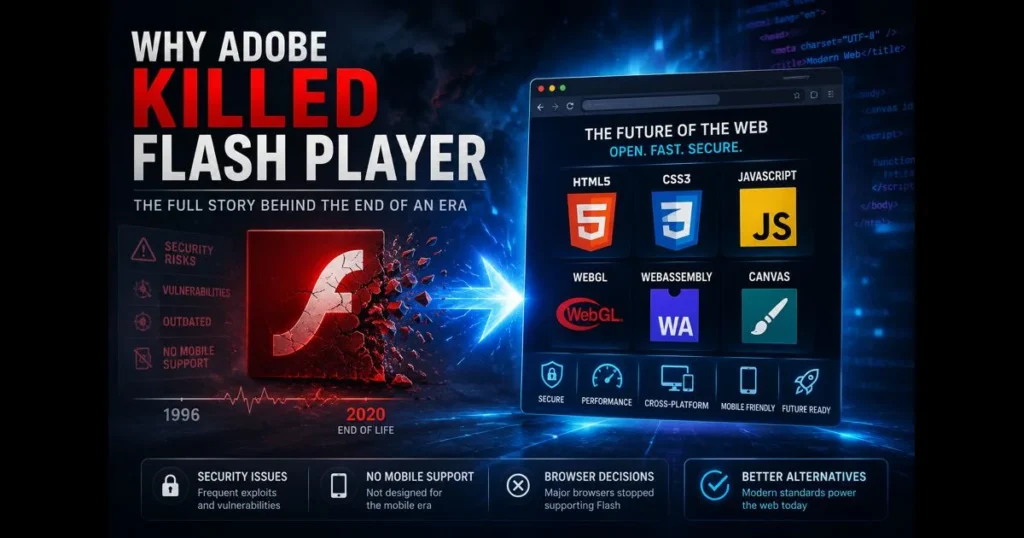
The end of Adobe Flash Player marked a pivotal shift in web technology. If you’ve ever asked why Flash was discontinued, the answer connects mobile computing, open standards, and years of lessons about browser security. For over 15 years, Flash defined online animation, video, and gaming. Then it unraveled—slowly and publicly—due to reasons that now influence every modern site and app. Understanding this transition isn’t just nostalgia; it highlights the evolution of web technology that shifted the internet from plugins to native, open capabilities, making the web faster, safer, and easier to maintain.
By 2021, the phrase “Flash Player dead” symbolized an industry-wide phaseout led by Adobe and adopted by all major browsers. This article explores Flash’s strengths, the shifting landscape, its vulnerabilities, and what replaced it. It also provides a roadmap for those with legacy content—yes, even old .swf files and training modules—hiding in backups or on intranets. Related reading: what is swf file.
- The Rise of Adobe Flash
- The Evolution of Web Standards
- Security Concerns with Flash
- Adobe’s Official Announcement and End of Life
- Impact on Developers and Content Creators
- Alternatives to Flash Player
- The Legacy of Flash in Digital Media
- Conclusion: Lessons Learned from the Flash Era
The Rise of Adobe Flash
Flash started as a way to accomplish what browsers couldn’t: render rich, animated, and interactive media consistently across platforms. In the early 2000s, the plugin model’s core strengths—an integrated authoring workflow, a consistent cross-platform runtime, smooth vector animation, and synchronized audio/video—made it the go‑to solution for designers seeking movement, sound, and interactivity. (See: Adobe Flash Player End of Life.)
If you visited Homestar Runner, played a Newgrounds minigame, or watched early streaming videos, you experienced what made Flash compelling. Vector-based animation kept file sizes small, streaming support made video feasible, and the timeline/scene metaphor allowed artists to storyboard like filmmakers.
Key features that made Flash popular
- Vector animation enabled smooth motion at small sizes.
- ActionScript facilitated scripting interactions, game development, and app-like experiences.
- Embedded audio/video support before native browser tags existed.
- A single runtime (the Flash Player plugin) ensured consistent rendering across major browsers.
Wondering “what is an SWF file?” It’s the compiled package containing a Flash movie or app—graphics, code, audio—ready for playback. This single format powered everything from banner ads to interactive storytelling.
The Evolution of Web Standards
As JavaScript engines, CSS, and browsers matured, Flash faced a formidable competitor: the standards-based technologies we now rely on. The debate around HTML5 vs Flash wasn’t merely about animation techniques; it was about ownership of the web’s core capabilities: a proprietary runtime versus open, interoperable standards.
HTML5 introduced native <video> and <audio> tags. Canvas and WebGL enabled 2D/3D graphics, CSS3 delivered sophisticated transitions, and JavaScript performance improved significantly with modern JIT compilers. The result? Less need for a separate plugin and fewer compatibility headaches.
The role of open standards
- Vendor-neutral and governed by bodies like WHATWG and W3C, they are implemented across browsers.
- Improve accessibility with semantic markup and built-in assistive tech support.
- Enhance discoverability as they are indexable for search without requiring a plugin.
- Reduce update friction—users don’t need to install a separate player.
Steve Jobs’s 2010 “Thoughts on Flash” letter captured the moment: Flash would not be supported on iOS, pushing developers towards open technologies that worked seamlessly across desktop and mobile. This shift drove momentum away from plugins and toward faster, more energy-efficient web standards.
Security Concerns with Flash
As Flash’s popularity soared, so did interest from attackers. The plugin became a prime target, with a constant stream of critical patches and emergency updates that burdened IT teams and frustrated users.
The familiar pattern emerged: memory corruption bugs, sandbox escapes, and drive-by downloads facilitated through malicious advertising. Exploit kits exploited vulnerable versions, while the update cycle struggled to keep pace. Coverage of the 2015 Hacking Team breach highlighted multiple unpatched Flash zero-days that were quickly exploited once disclosed.
Major incidents and risks
- Repeated zero-day vulnerabilities that allowed remote code execution.
- Malicious actors bundling malware as a “fake flash player” installer to deceive users into granting access.
- Malvertising campaigns using embedded Flash to deliver payloads without user interaction.
- Enterprise environments remaining on older versions due to dependencies, widening the risk window.
These issues were far from ordinary. The combination of a vast user base and a complex, closed runtime turned patching into a reactive measure. For security teams and browser vendors, security vulnerabilities in Flash became a constant, operational threat.
Adobe’s Official Announcement and End of Life
In July 2017, Adobe announced that Flash Player would reach its end of life on December 31, 2020, and that it would cease distribution and updates after that date, collaborating with Apple, Facebook, Google, Microsoft, and Mozilla for a coordinated phaseout. This Adobe Flash end of life notice provided organizations over three years to migrate content and prepare for the transition.
The timeline was clear. Browser vendors began disabling Flash by default, increasing friction for users who wanted to enable it, and have since removed built-in support entirely. Adobe followed by blocking Flash content post-cutoff and recommending uninstallation. Updates removed the plugin on Windows, while macOS and Linux users received guidance to uninstall.
By early 2021, the reality was clear: Flash Player was effectively dead as an ecosystem, with content blocked even if the files still existed on servers. A decade earlier, Flash was an enabler; now it had become a liability.
What it meant for users and teams
- Consumer browsers ceased loading Flash content, even from intranets.
- Vendors updated policies: no new security fixes, no downloads, and explicit removal guidance.
- Compliance teams treated remaining Flash content as vulnerabilities to eliminate.
Unsure if a site or legacy portal still references Flash? Run a flash compatibility check. Our site’s built-in Flash Checker
Your Flash Compatibility Report
- Browser detected — ……
- WebAssembly (required by Ruffle)…
- WebGL graphics acceleration…
- Secure connection…
object/embed tags, and common loader scripts, suggesting the quickest migration paths. It’s the easiest way to identify remnants before they become support tickets.
Impact on Developers and Content Creators
The end of Flash wasn’t just a browser update; it was a migration project. Studios, educators, and enterprises had to determine what to port, retire, and preserve. Each decision carried a price tag and a timeline.
Games and animated shorts faced two choices: recreate experiences using Canvas/WebGL or emulate them. The open-source Ruffle project can render many older SWF animations directly in modern browsers without the Flash plugin, making cultural preservation easier while developers assess what to rebuild.
Transition challenges
- Code and asset conversion: Transitioning from ActionScript 2/3 to JavaScript/TypeScript required rethinking architecture, not just syntax.
- Feature parity: Peer-to-peer, DRM, or niche filters were not one-to-one matches in early migration tools.
- Performance tuning: GPU pipelines differ between Flash and Canvas/WebGL; what was smooth in Flash might stutter until optimized.
- Accessibility and SEO: Rewriting offered a chance to improve content navigability and indexability—something many Flash sites lacked.
For educational teams, authoring tools that once published to SWF shifted to HTML5 outputs. Adobe Animate, for instance, integrated HTML5 Canvas export to facilitate the user transition from Flash, while courseware vendors updated templates for SCORM/xAPI in standards-native formats.
Alternatives to Flash Player
Today, modern web standards and frameworks—such as HTML5, CSS3, and WebGL—run natively in browsers and serve as the runtimes that replaced Flash. This fundamental change underpins most of the modern stack that replaced Flash’s capabilities, from video streaming to complex graphics and app-like interfaces.
What replaced Flash functionality
- HTML5 media: Native
<video>/<audio>, Media Source Extensions (MSE), and Encrypted Media Extensions (EME) support adaptive streaming and DRM. - Graphics and animation: Canvas 2D, SVG, CSS animations, and WebGL for 3D. Libraries like Three.js, PixiJS, and Phaser simplify game and visual development.
- Authoring and tooling: Adobe Animate (publishes to HTML5 Canvas/WebGL), GreenSock (GSAP) for high‑performance timeline-based animation, and Unity WebGL for exporting interactive 2D/3D experiences to the web.
- Compute and portability: WebAssembly enables near-native performance for complex applications, often used alongside Web Workers.
- Device and app features: Service Workers, WebRTC, and modern APIs facilitate real-time communications, offline experiences, and installable PWAs.
These interactive content alternatives provide smoother performance, improved battery life on mobile, and stronger security boundaries. They also integrate seamlessly with the platform: ARIA for accessibility, semantic HTML for structure, and CSS for responsive layouts. For creators, this means fewer plugins, broader reach, and tools that endure over time.
The Legacy of Flash in Digital Media
Flash made the early web feel dynamic. It was not just a technology; it was a medium and a culture. Newgrounds nurtured talent. JibJab transformed e-cards into shareable comedy. Independent animators built careers with little more than a timeline, vector shapes, and a passion.
This digital media legacy continues to influence today’s toolchains and genres. Modern animation workflows borrow from Flash’s timeline paradigm. Casual web games, motion-rich storytelling, and bite-sized interactive experiences have evolved into mobile games and web applications built with open technologies. Even YouTube, which began with Flash for playback, helped drive the shift to native video as it adapted to diverse devices and bandwidths Flash could not accommodate.
Preservation is crucial. Archives now leverage emulation to ensure historic works remain playable—a reminder that while formats may fade, creativity endures.
Conclusion: Lessons Learned from the Flash Era
Flash thrived because it resolved significant web challenges. It faltered as the web advanced—and because closing security gaps in a vast, proprietary runtime proved unmanageable. The net effect? A safer, faster, more accessible platform where open standards now bear the weight once carried by Flash.
For teams still unearthing remnants, here’s a practical checklist to address now:
- Inventory content. Search your codebase and CMS for
.swf,object/embedtags, and Flash-specific loaders. - Run a Flash compatibility check with our site’s Flash Checker to identify pages referencing legacy assets and guide migration.
Your Flash Compatibility Report
- Browser detected — ……
- WebAssembly (required by Ruffle)…
- WebGL graphics acceleration…
- Secure connection…
- Prioritize by value. Rebuild what generates revenue or drives learning outcomes; preserve the rest with screenshots or emulation when appropriate.
- Migrate to standards. Use HTML5 Canvas, SVG, and modern JS frameworks; for video, utilize native tags with adaptive streaming.
- Retire the plugin. Remove any installers and educate users on avoiding “fake Flash Player” prompts, which are likely malware.
The web continues to evolve. Embracing this pace—and designing for portability, accessibility, and security—will spare you the next painful rewrite. Start by scanning your properties with our Flash Checker, then select one high-impact piece of legacy content to modernize this quarter. Your future self—and your users—will thank you.
Frequently Asked Questions
Why was Flash discontinued?
Flash was discontinued primarily due to security vulnerabilities and the rise of more efficient web standards like HTML5, CSS3, and JavaScript. These technologies provide better performance and security, leading to a decline in the need for Flash.
What were the main issues with Flash that led to its discontinuation?
The main issues included frequent security exploits, poor performance on mobile devices, and a lack of support from major browsers. As web technology evolved, these factors made Flash increasingly obsolete.
What alternatives are available now that Flash is discontinued?
With Flash discontinued, developers are encouraged to use HTML5, CSS3, and JavaScript for animations and interactive content. These technologies are widely supported across all modern browsers and devices.