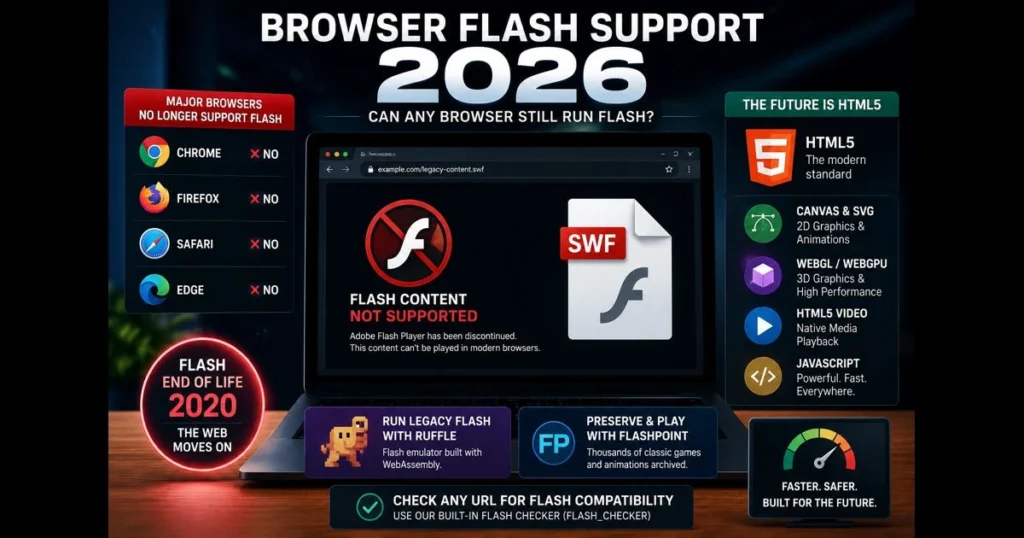
If you’ve searched “browser flash support 2026” this month, you’re not alone. Many still encounter legacy training modules, museum exhibits, and vintage web games that once ran on Adobe Flash, now reduced to empty boxes. As of 2026, mainstream browsers are expected to have completely moved on, leaving Flash behind. This article clarifies Flash’s status in modern browsers, the reasons for its retirement, and viable alternatives—whether you’re just trying to play an old .swf file or managing a legacy site. We’ll also introduce our built-in Flash Checker (flash_checker) to quickly assess any URL’s Flash compatibility and suggest practical next steps. Expect clear guidance on alternatives like HTML5, Canvas, WebGL, and emulation via Ruffle, along with migration advice for teams handling archived content. By the end, you’ll understand what still works, what doesn’t, and how to adapt.
- Understanding Flash and Its Evolution
- Current Status of Flash Support in Major Browsers
- Does Chrome Support Flash in 2026?
- Impact of Flash End of Life on Web Content
- Alternatives to Flash for Web Developers
- User Experience Without Flash
- Future of Browser Technologies Beyond Flash
- Conclusion: Navigating the Browser Landscape in 2026
1. Understanding Flash and Its Evolution
Overview of Adobe Flash and its historical significance
For over a decade, Adobe Flash Player powered animated banners, browser games, rich e-learning modules, and the initial surge of streaming video. With its vector graphics, timeline animations, and ActionScript, Flash was both approachable and expressive. Early YouTube relied on it, along with countless creative portfolios and interactive explainers. If you were online in the 2000s, you likely used Flash daily.
But this influence came with drawbacks. Flash required a plug-in, leading to security vulnerabilities and performance issues. On mobile, the plug-in model conflicted with battery needs and App Store policies. Gradually, the web shifted from proprietary runtimes to native browser capabilities. (See: CDC.)
The transition from Flash to HTML5 and other technologies
The narrative of “HTML5 vs Flash” reflects the web’s maturation. Native features—HTML5 video/audio, Canvas for 2D drawing, CSS animations, SVG, WebGL for 3D, and enhanced JavaScript engines—began to replace Flash’s functionality. Apple’s refusal to support Flash on iOS accelerated this transition, and major browsers indicated deprecation plans years in advance. When Adobe ended Flash support in late 2020 and started blocking content in early 2021, it marked the formal end of an era.
So, why was flash discontinued? The short answer: security risks, performance issues on mobile, and the burden of maintaining a closed plug-in, compounded by the availability of robust, open alternatives that browsers could optimize and secure directly.
2. Current Status of Flash Support in Major Browsers
Examine Flash support in Chrome and its current status
Google Chrome no longer includes the Pepper Flash module and does not support side-loading a system Flash plug-in. Modern Chrome versions simply do not execute SWF content. Enterprise policies that previously provided temporary reprieve have also ended. If a webpage embeds Flash, Chrome treats it as inert content; users see a blank area or a message from the site, not a prompt to run the plug-in. Related reading: what is webassembly.
For users, this means Flash support in Chrome is effectively nonexistent. Site owners face the reality that any experience reliant on Flash will appear broken unless they’ve implemented an emulator or migrated to an alternative. Related reading: play swf online.
Comparison of Flash support in Firefox, Safari, and Edge
Firefox removed NPAPI plug-in support years ago and eventually dropped Flash as well. Safari followed suit on macOS and iOS, consistent with Apple’s long-standing stance against plug-ins. Microsoft Edge, now built on Chromium, mirrors Chrome’s approach, meaning it also does not execute Flash. Across both desktop and mobile platforms, the picture is clear: no built-in Flash support, no settings to enable it, and no official extension to restore functionality.
In short, for Flash support in 2026: the big four browsers—Chrome, Firefox, Safari, and Edge—do not run Flash, and that stance is unlikely to change.
3. Does Chrome Support Flash in 2026?
Detailed analysis of Chrome’s policy on Flash content
Users still search “does Chrome support Flash,” hoping for a hidden toggle. In 2026, there isn’t one. Chrome’s security model views legacy plug-ins as vulnerabilities. It does not include a Flash interpreter, doesn’t whitelist SWF MIME types, and displays Flash elements as static or blocked. Even developer flags won’t restore the old runtime, and installing a standalone projector doesn’t integrate it into Chrome’s rendering path.
This reflects a broader trend: browsers are consolidating around secure, sandboxed, standards-based capabilities. Plugins that bypass these frameworks won’t return, as they contradict the modern focus on user safety and performance.
Alternatives for users needing Flash functionality in Chrome
- Emulation with Ruffle: Ruffle is a Rust-based Flash emulator that compiles to WebAssembly, running within the page. Site owners can implement it to automatically render SWF content for visitors. If you’re a user, seek out sites that have adopted Ruffle—many museums and indie game portals have done so. WebAssembly is a fast, portable code format that runs alongside JavaScript.
- Preservation via Flashpoint: BlueMaxima’s Flashpoint project offers a curated launcher and offline archive of web games and animations. It doesn’t restore Flash to Chrome; rather, it provides a desktop experience that faithfully preserves old content.
- Standalone players: Projects like Lightspark can open some SWFs outside the browser, but compatibility varies, especially for complex ActionScript 3 content. Exercise caution with third-party downloads.
- Developer-side migration: The most reliable path is converting content to Canvas/SVG/WebGL/HTML5 video or providing an alternative experience. This ensures that Chrome and other modern browsers can render it natively.
If you want to play SWFs online today, look for reputable hosts using Ruffle or similar emulation, or consider preservation-focused platforms that bundle the emulator for you.
4. Impact of Flash End of Life on Web Content
Effects on websites that relied heavily on Flash
Here’s the immediate impact many teams experienced with Flash’s end of life: legacy e-learning courses stalled mid-lesson, product configurators vanished from marketing pages, and interactive data dashboards on intranets went blank. Some digital exhibits in education and cultural sectors temporarily disappeared. Advertising workflows that depended on SWF creatives had to be rebuilt, and long-tail B2B portals uncovered hidden dependencies years after their original agencies closed.
The extent of loss varied. Simple timeline animations were easy to recreate, while complex ActionScript-driven apps with custom components proved more challenging to rebuild, especially without the original source files (.fla, .as). Projects that pushed Flash beyond basic animation faced tougher hurdles.
How developers are adapting to the post-Flash era
Teams typically choose among three paths: immediate migration to web standards, emulation as a stopgap or preservation measure, or a complete redesign. Education providers often opt for HTML5 courseware rebuilds with SCORM/xAPI support. Cultural institutions incorporate Ruffle into exhibit pages to retain historical authenticity while prioritizing safety. Product teams seize the opportunity to rethink UX and integrate with modern frameworks.
Across all approaches, the focus is on predictable performance, accessibility, and security—qualities that come standard with native browser features and vetted libraries.
5. Alternatives to Flash for Web Developers
Overview of modern technologies replacing Flash
- Canvas and SVG for 2D: Ideal for charts, infographics, and vector animations. Libraries like GreenSock enable efficient animations with GPU-friendly transforms.
- WebGL and WebGPU: Suitable for 3D scenes, simulations, and complex visualizations. Three.js and Babylon.js remain reliable, while WebGPU opens doors to advanced graphics capabilities.
- HTML5 video/audio: Offers native media playback with support for captions and chapters.
- Modern JS frameworks: React, Vue, and Svelte provide component models that integrate well with Canvas/SVG for interactive UIs.
- WebAssembly: Power-intensive tasks—like decoders, emulators, and physics—can benefit from Wasm modules for near-native speed in the browser.
These technologies serve as practical Adobe Flash alternatives, requiring no plug-ins and benefiting from continuous browser optimization.
Best practices for migrating existing Flash content
- Inventory and triage: Use our site’s Flash Checker (flash_checker) to scan URLs and produce a flash compatibility check. Classify items by complexity (simple animations vs. ActionScript-heavy apps) and audience priority.
- Recover assets: Look for original .fla and .as files. If missing, extract images, audio, and timelines from SWFs using reliable tools, then rebuild logic in JavaScript.
- Choose the right target: Use Canvas for frame-by-frame animations, SVG for scalable icons and diagrams, WebGL/WebGPU for 3D, and native media for video/audio. Avoid unnecessary complexity.
- Consider emulation as a bridge: Ruffle effectively handles many ActionScript 1/2 projects and some ActionScript 3. Utilize it to keep content accessible while planning a proper rebuild.
- Build accessibility in: Provide keyboard navigation, text alternatives, and reduced-motion options—features often lacking in Flash-era projects.
- Test for browser compatibility: Validate rendering and performance across Chrome, Safari, Firefox, Edge, and mobile browsers, including low-power devices in QA.
- Document and decommission: Archive the original SWF and related materials with metadata so future teams understand what changed and why.
6. User Experience Without Flash
How the absence of Flash impacts everyday browsing
For most users, the web feels cleaner. No permission pop-ups, fewer CPU spikes from rogue animations, and media starts faster while adapting to screens and bandwidth. Security warnings are less frequent. However, a link to a 2009 physics game may do nothing unless the host has integrated an emulator or a rewrite.
When users encounter broken pages, clear messaging is crucial. A small banner pointing to an HTML5 version or explaining that the content has been preserved via an emulator can prevent user frustration.
User feedback on websites that transitioned away from Flash
Sites that invested in thoughtful rewrites tend to receive praise for quicker load times and mobile readiness. Where emulation was employed, nostalgia prevails—users appreciate seeing the original experience live again, quirks and all. Frustration arises mainly when a page fails silently. A concise notice that explains “why was Flash discontinued” and offers an alternative path is invaluable.
7. Future of Browser Technologies Beyond Flash
Emerging trends in web development post-Flash
The plug-in era has closed one door while open standards have opened many others. WebAssembly is powering advanced creative tools in-browser, from audio workstations to 3D editors. WebGPU enables higher-fidelity graphics and computation. Media APIs are enhancing low-latency streaming and captioning. On the application front, PWAs and view transitions smooth route changes, making experiences feel more native. These web development trends are significant because they unlock immersive, performant experiences without requiring users to install anything.
Preservation will remain a priority as well. Emulators like Ruffle safeguard cultural artifacts from the Flash era, enabling responsible online access while ensuring user safety in browser environments.
Predictions for browser support and content delivery
Expect browsers to double down on safety and performance: tighter permission models, increased process isolation, and APIs designed to constrain risky behaviors. Content delivery will favor streaming, incremental hydration, and GPU-accelerated rendering. The outlook for reviving legacy plug-ins is grim, but support for standards that replace those capabilities will continue to grow. In essence, the future promises enhanced capabilities with fewer risks.
8. Conclusion: Navigating the Browser Landscape in 2026
Recap of key points regarding Flash support
Flash is no longer part of modern browsers, period. Chrome, Firefox, Safari, and Edge do not support it and will not reinstate it. For continuity with historical content, emulation (notably Ruffle) is your best short-term solution, while migration to standards represents the long-term fix. For organizations, migrating Flash content involves not just code but also accessibility, maintainability, and alignment with current browser capabilities.
Final thoughts on adapting to new web standards
If you manage a site with lingering SWFs, start with an audit. Use our built-in Flash Checker (flash_checker) to identify pages and assess compatibility, then prioritize what to emulate and what to rebuild. For users, remember that sites offering modern alternatives or safe emulation are on the right track. The smartest path in 2026 is to embrace the open web stack—Canvas, SVG, WebGL/WebGPU, and WebAssembly—and let browsers do what they’re designed to do: deliver secure, fast, and resilient experiences at scale. Ready to get started? Scan a URL with the Flash Checker today and plot your next move.
Frequently Asked Questions
Will browsers still support Flash in 2026?
No, browsers are not expected to support Flash in 2026. Major browsers like Chrome, Firefox, and Edge officially discontinued Flash support on December 31, 2020.
What alternatives are available to Flash for web applications in 2026?
In 2026, developers are encouraged to use HTML5, CSS3, and JavaScript as alternatives to Flash for creating interactive web applications. These technologies are widely supported and provide better performance and security.
How should developers transition away from Flash before 2026?
Developers should start by assessing their existing Flash content and replacing it with modern web technologies like HTML5. It’s also important to test the new solutions across different browsers to ensure compatibility and functionality.